ModbusTool 2.2 — Windows 10 / 11 Product sheet · A-300

01 / ModbusTool A-301

ModbusTool — Find it. Test it. Hand it over.

The Windows tool for Modbus commissioning: find every device on the line, test each point without risk, and hand the client a report of what you proved. Built by an engineer on building sites since 2005.

Free for commercial use · Pro one-time · offline key, no account

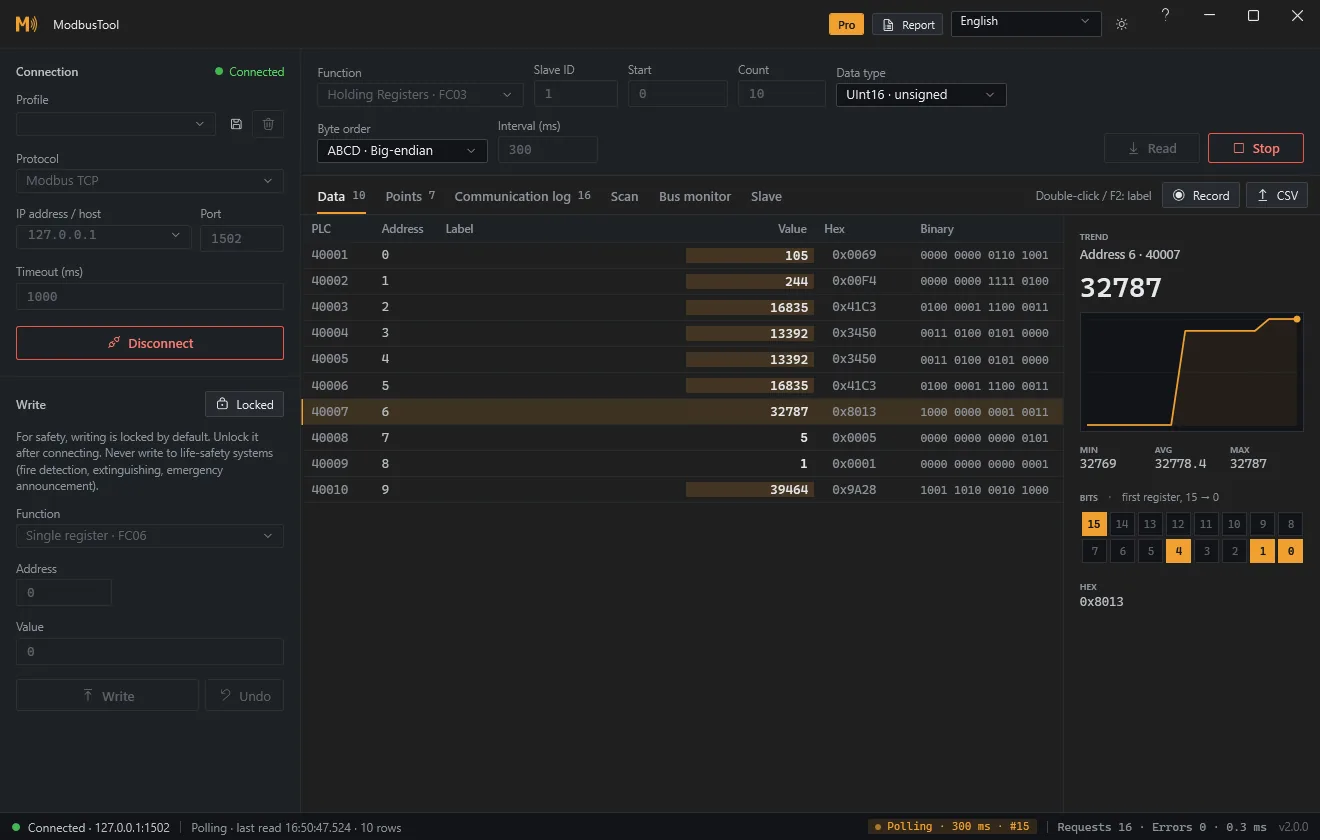
Fig / A-301 — Live pollingTrend · bit grid · raw frames
ModbusTool polling a device: register table with live values, a trend and the bit grid of a status word
Modbus TCP · RTU · RTU over TCPDark print · 1:1 screenshot

Modbus TCP, Modbus RTU, RTU over TCP, function codes 1 to 6, 15, 16 and 43, RS-485, twelve languages, offline license.

02 / Two editions A-302

Test for free. Commission with Pro.

Free · the test bench0 USD

Free

Forever, commercial use included

Everything you need to talk to a device by hand and trust what you see.

  • Modbus TCP, RTU and RTU over TCPUSB–RS-485 adapters and serial-to-Ethernet converters
  • Read and write FC01–06, 15 and 16Eight data types, four byte orders
  • Writes that cannot surprise youLocked until unlocked, read back and verified, one-click undo
  • Find the devices on a lineSlave ID scan, baud rate and parity detection, FC43 device identity
  • Polling with trend and bit gridLabels, connection profiles and CSV export
  • See the line itselfSuccess rate and p95 latency per slave, raw TX / RX frames
Download free

Pro · the commissioning kit49 USD / seat

Pro

One-time · 12 months of updates included

What a whole panel, a site visit and the handover need — in the same app.

  • Everything in FreeSame app, unlocked with a key
  • Register map discoveryMap an undocumented device and export the map
  • Point listThe vendor's register list in engineering units
  • Slave simulatorCommission the BMS before the device arrives
  • Passive RS-485 bus monitorListen to a live line without transmitting
  • Long-term recordingHours or days of values to CSV
  • Commissioning reportThe handover document, HTML or PDF
Buy Pro

03 / What Pro adds A-303

Six tools for the whole job.

01 / 06
A-303.1

Register map discovery

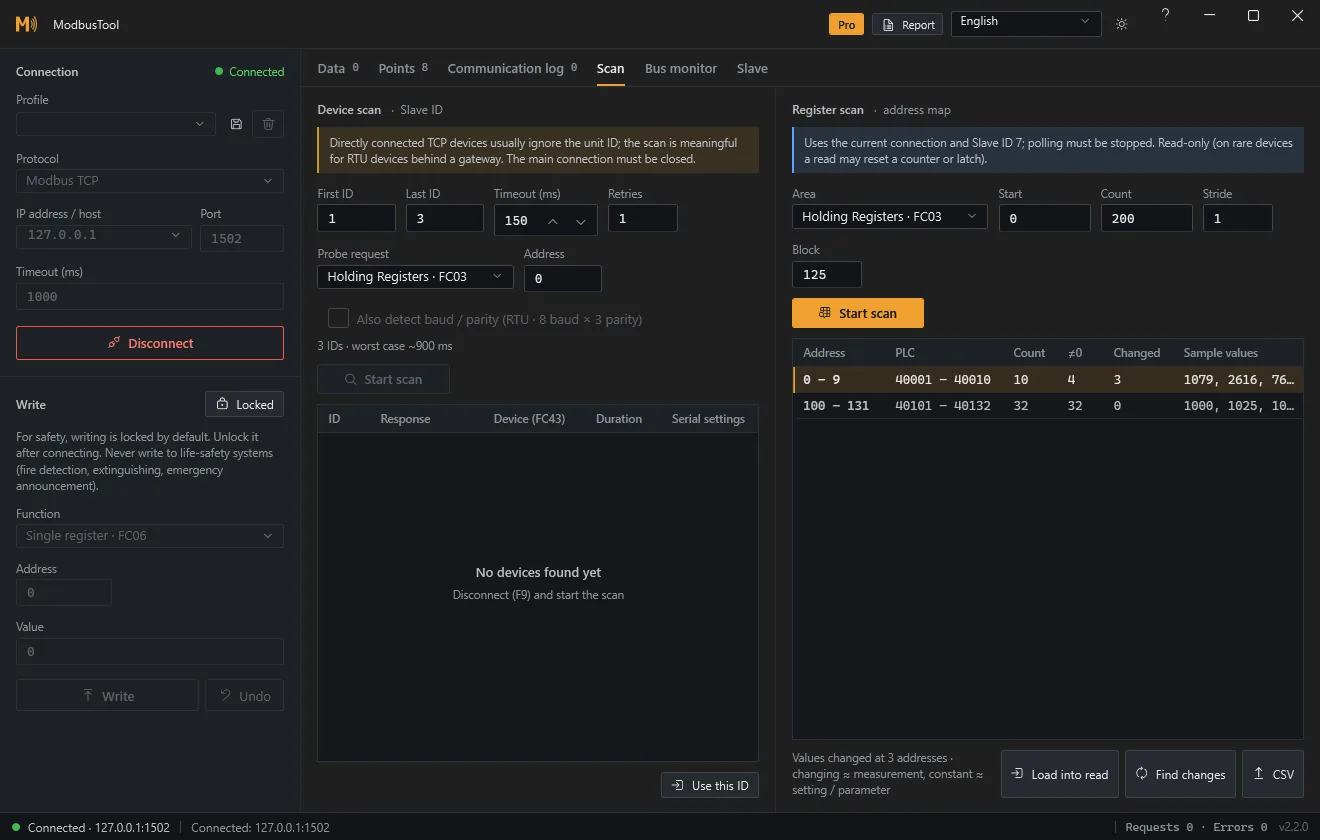
Point ModbusTool at a device without documentation. It walks the address space in safe steps and returns the map: which ranges answer, which raise exceptions, and which values change while you watch. Load any range into the table with one click, or export the map as CSV.

GainNo more guessing addresses from a missing PDF

Register scan of a device: the ranges that answered, the exceptions and the values that changed
Fig / A-303.1 — Register map of an undocumented devicePro
02 / 06
A-303.2

Point list

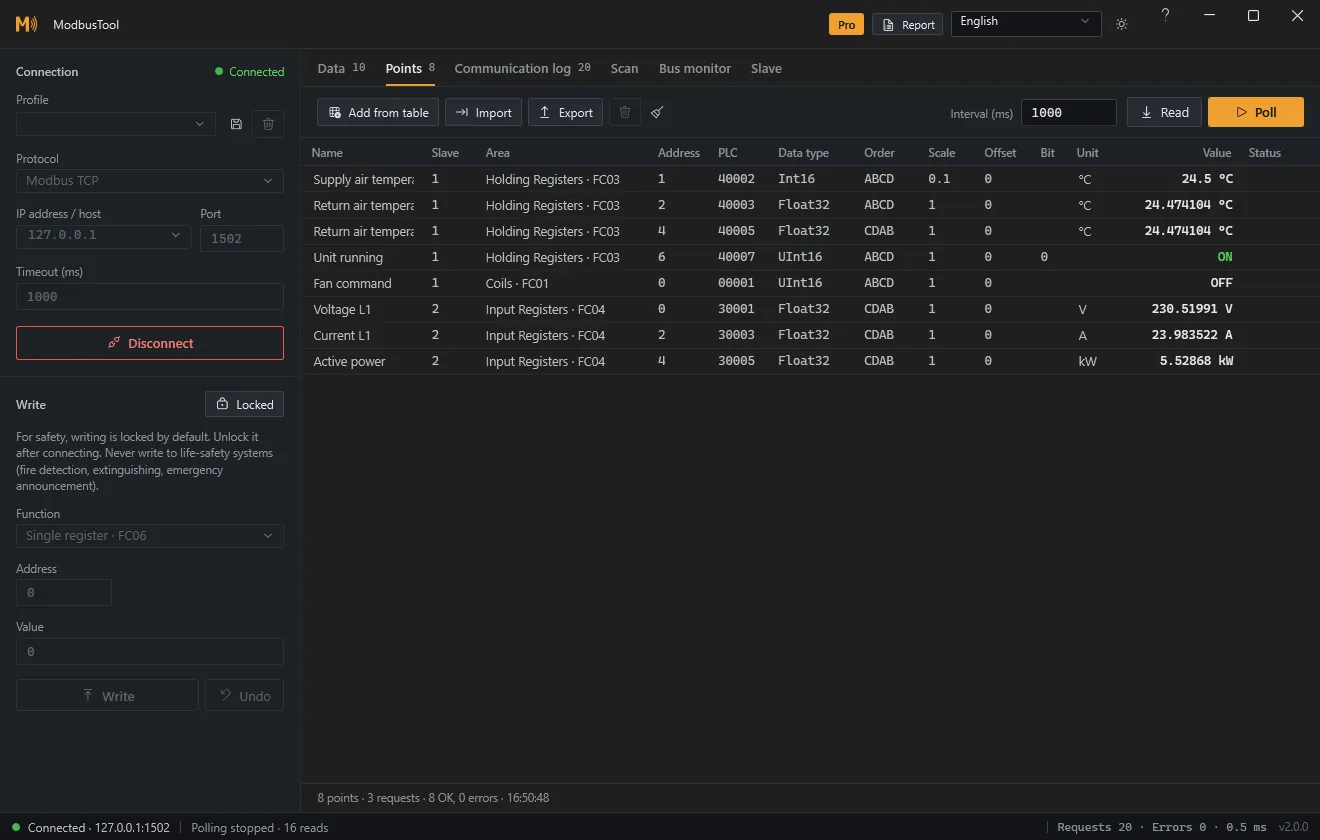
Import the vendor's register list as CSV — names, data types, scale, units and Modicon addresses — and read the whole device as engineering values. Requests are merged automatically, so a hundred points cost a handful of polls.

GainA whole device in engineering units, not raw registers

Point list with names, slave IDs, Modicon addresses, data types and values in engineering units
Fig / A-303.2 — Point list in engineering unitsPro
03 / 06
A-303.3

Slave simulator

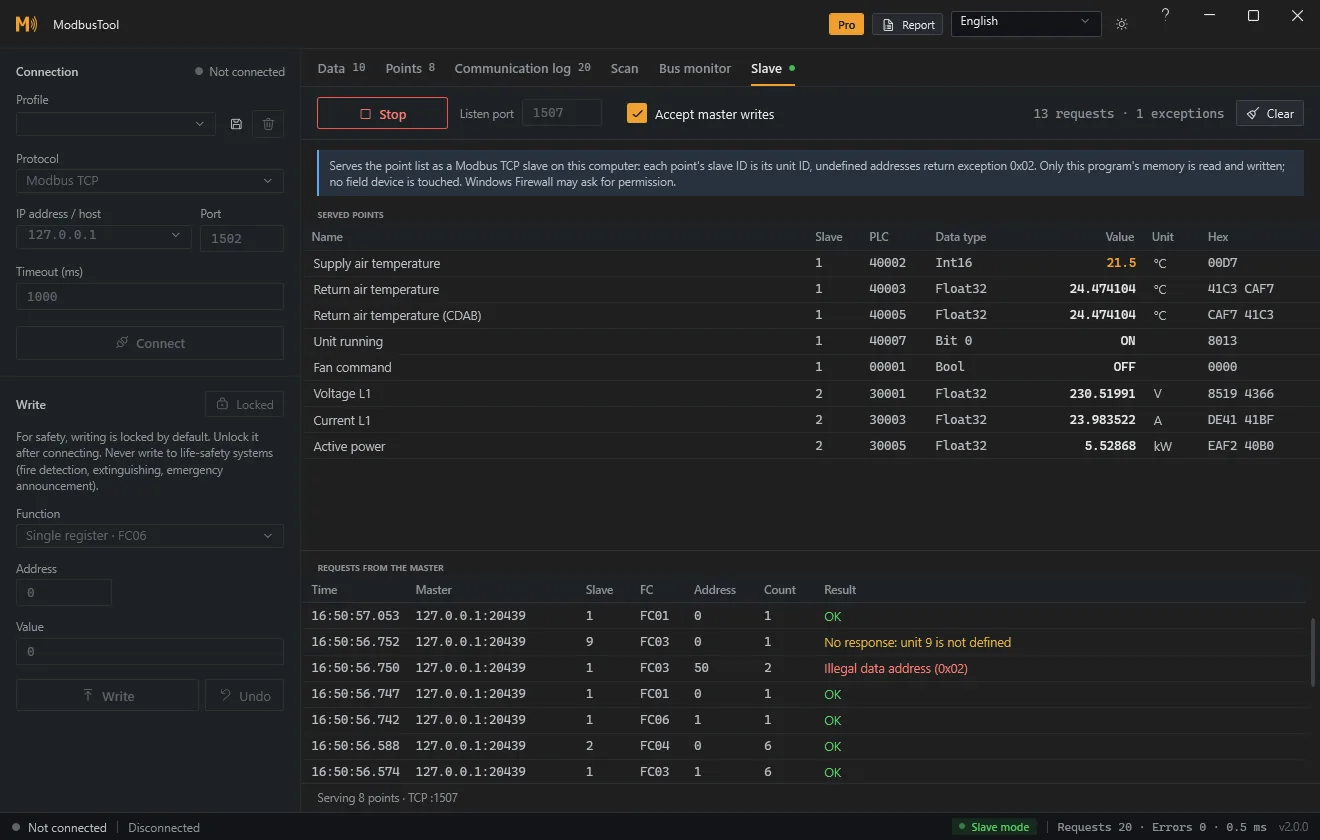
Serve the point list as a Modbus TCP or RTU slave. The BMS polls ModbusTool as if the chiller were already on site; you change values, force exceptions and watch every request it makes.

GainGraphics and alarms tested before the hardware arrives

Slave mode serving eight points while a master reads and writes them, with the request log below
Fig / A-303.3 — Slave mode with the master’s requestsPro
04 / 06
A-303.4

Bus monitor

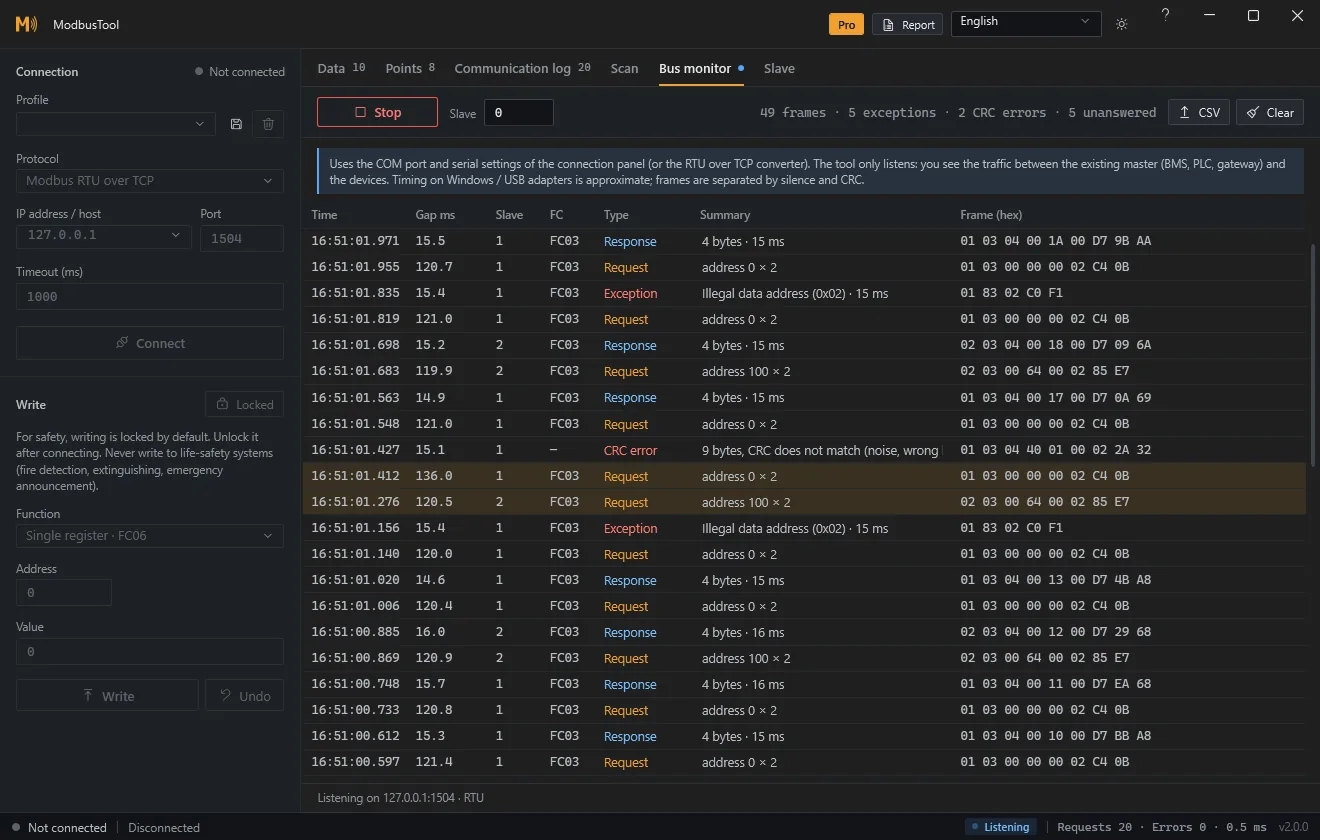
Listen to a live RS-485 line without transmitting a single byte. ModbusTool pairs requests with responses and shows latency, CRC errors, exceptions and the polls nobody answered.

GainThe cause of an intermittent line, without touching it

Bus monitor decoding RS-485 traffic: requests, responses, an exception and a CRC error
Fig / A-303.4 — Passive RS-485 bus monitorPro
05 / 06
A-303.5

Long-term recording

Record polled values to CSV for hours or days, with timestamps, while the laptop sits in the panel. Catch the value that drifts at night or the device that drops out once a day.

GainEvidence for the fault that never happens while you watch

06 / 06 · A-303.6Pro

The commissioning report, written while you work.

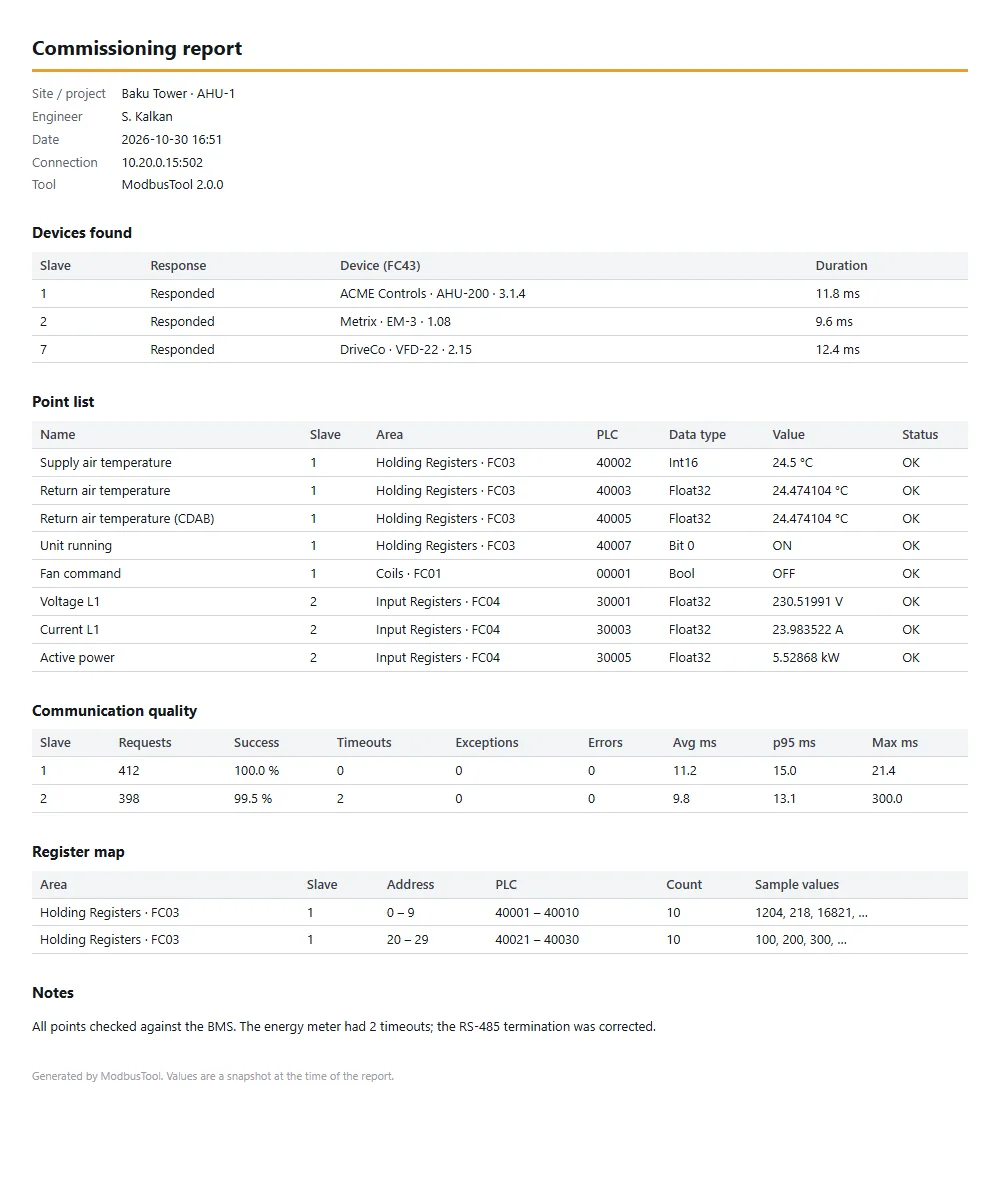
One click turns the session into the document the client signs: devices found with their identity, the point list with live values, communication quality per slave, the register map and your notes. HTML that prints cleanly to PDF.

Devices foundPoint listLine qualityRegister mapNotes
Commissioning report listing devices found, the point list, communication quality and the register map
Fig / A-303.6 — Commissioning report, sample site

04 / Specification A-304

One sheet, no small print.

Protocols
Modbus TCP · RTU · RTU over TCPClient (master), and slave in Pro
Function codes
01–06 · 15 · 16 · 4343 reads the device identity
Data
Eight types · four byte ordersBits, scale, units and labels
Serial
Any USB–RS-485 adapterOr a serial-to-Ethernet converter
System
Windows 10 / 11, 64-bitSelf-contained, no .NET to install
Install
None — unzip and runDemo Modbus simulator included
Languages
TwelveEN · TR · RU · DE · FR · IT · ES · NL · AR · ZH · JA · KO
Privacy
No account, no telemetryTalks only to your devices

05 / Pricing A-305

One license. Per seat, once.

  • Yours to keepEvery version released during your update period, without time limit
  • 12 months of updatesNew features and fixes, then renew only if you want them
  • Works offlineThe key is checked on the computer, no account and no activation server
  • A proper invoiceCompany name and VAT ID at checkout, issued by Paddle
  • 14-day refundNo questions asked

ModbusTool ProPer seat · one-time

49USDper seat
plus tax where it applies

Total49 USD

Secure checkout by Paddle. Taxes are calculated at checkout.

Cards · PayPal · local methodsVAT invoice14-day refund

Team license, purchase order or bank transfer? Write to hello@sabahattinkalkan.com.

06 / After you pay A-306

From payment to activated.

01 / 03

Pay

The checkout opens on this page. Paddle, our reseller, accepts cards, PayPal and local methods and sends the receipt.

02 / 03

Receive

Your license key appears on screen the moment the payment clears. Keep that page: the same link shows the key again.

03 / 03

Activate

In ModbusTool, click the Free badge, paste the key and press Activate. No internet connection needed.

Pay once. Keep the key. Work offline.

07 / General note A-307Applies to every edition

ModbusTool is a commissioning and diagnostic tool, not a control system. Do not write to, command or simulate life-safety systems — fire detection, suppression, voice evacuation — without the owner’s authorisation and the applicable procedures.

08 / Download A-308

Unzip. Run.

Self-contained: no installer and no .NET to install. The package also contains a demo Modbus simulator, so you can try every feature without hardware.

Download ModbusTool 2.2.0
Version
2.2.0
Package
ZIP, 94 MB
System
Windows 10 / 11, 64-bit
Edition
Free, Pro with a key

SHA-256

11fd600577c7730515d2a0046f4d11066ff21cdc4c5b2e5bf07ec8bbcce90cc4

The executables are not code-signed yet, so Windows SmartScreen may ask you to confirm the first start (More info → Run anyway). Every release, its checksum and its notes are also on GitHub ↗.

09 / Questions A-309

Asked on site, answered here.

What is the difference between Free and Pro?

Free is a complete manual test tool: connect, find devices, read and write safely, poll and trend. Pro adds what a whole commissioning job needs: register map discovery, point lists, the slave simulator, the bus monitor, long-term recording and the commissioning report.

Can I try Pro before buying?

Free shows every Pro feature in place, so you can see where each one sits. If Pro does not fit your work, you get a full refund within 14 days, no questions asked.

Does ModbusTool need an internet connection?

No. It talks only to your Modbus devices. The license key is verified on your computer, so activation works offline too.

What happens after the 12 months?

Nothing stops. Every version released during your update period keeps working, without time limit. Versions released later need a renewed license.

How do seats work?

One seat is one computer. Move a seat to another computer by removing the license from the old one. Buy as many seats as you need in one order.

Can I get an invoice for my company?

Yes. Enter your company name and VAT ID at checkout; Paddle issues the invoice. For a purchase order or bank transfer, write to us.

Does the app send any data?

No usage data, no device data, no telemetry. See the privacy policy.